DGCA Pariksha - Exam Registration | Admin Card | Results
The registration for all the computer based written exams are done through DGCA Pariksha while the registration for Oral examinations is done through eGCA Portal. The Pariksha DGCA portal is dedicated to written examinations for Pilot and AME exams. The portal is not only for registration of exams but also for declaration and viewing of results, announcements, and a lot more. It is an all in one portal for written examinations for Pilots, Flight Instructors, and Aircraft Maintenance Engineers.
Below is a step by step guide on how to register for exams on the Pariksha DGCA Portal.
Note: The DGCA Pariksha Portal is not compatible on phones, tablets or iPad. Please use either a laptop or a desktop to register for the exams.
Step 1: Login to DGCA Pariksha Portal
Once you get your Computer Number from eGCA:
Go to Pariksha portal (separate from eGCA) or paste this link in your browser https://pariksha.dgca.gov.in/
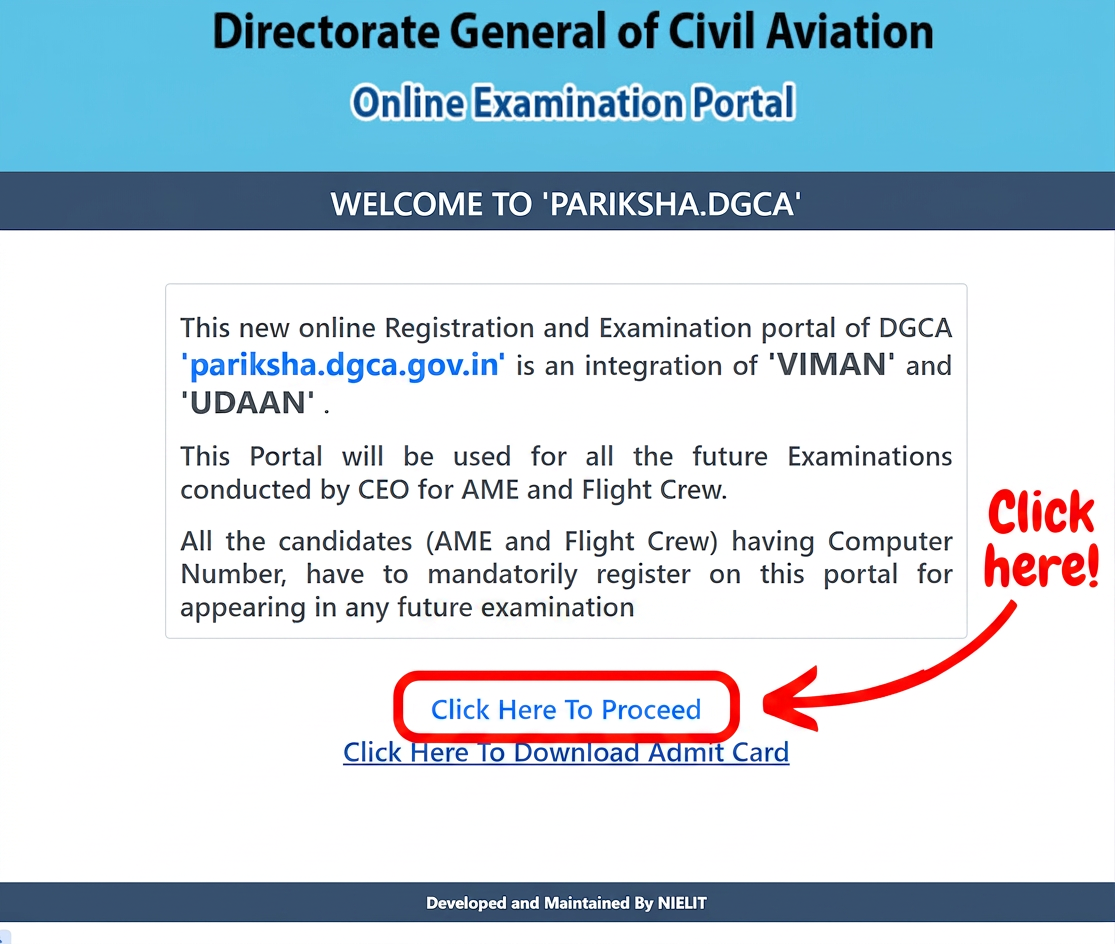
You will see a pre login page as below. Click on the "Click Here to Proceed" Button as indicated below. The second button is for downloading the Admit Card (We will come to it later).
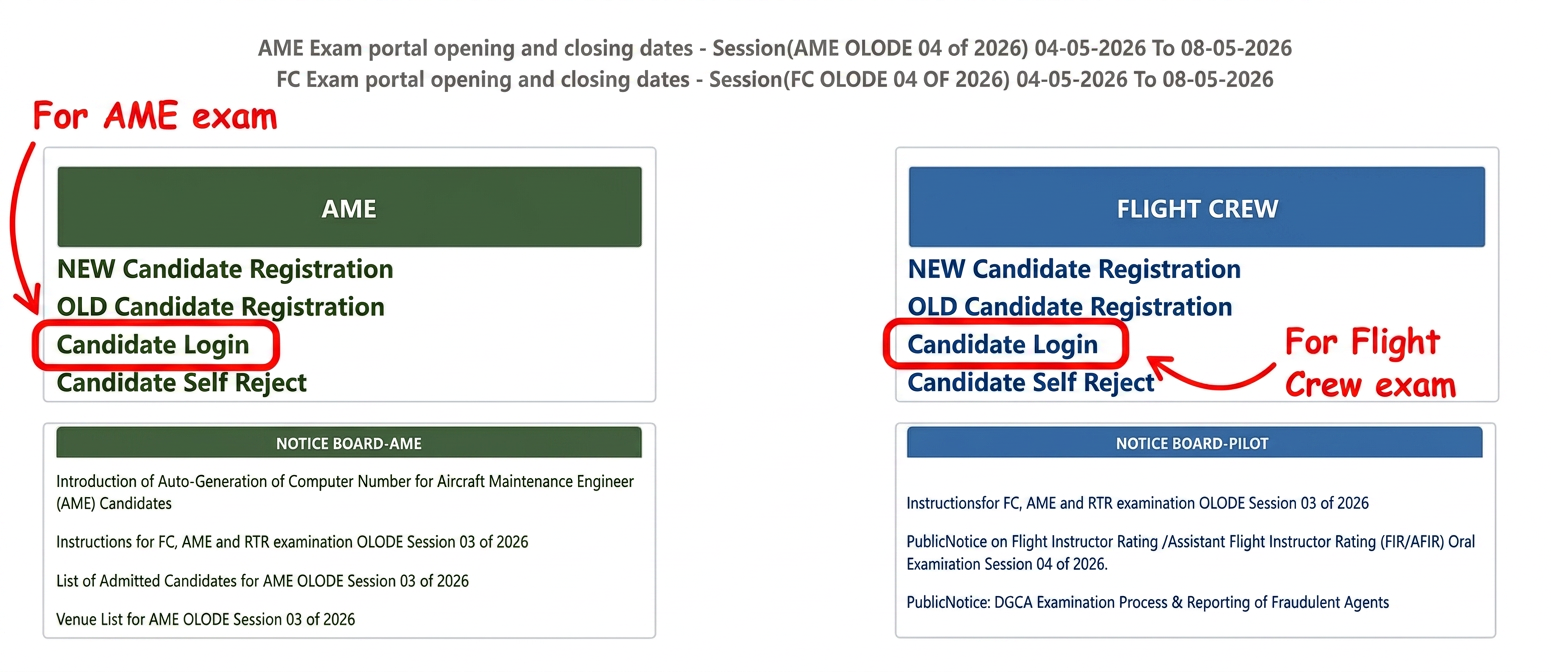
In the next screen, click on Candidate Login for either Flight Crew or AME. (Tip: Flight Crew is the same as registering for Pilot exams in India).
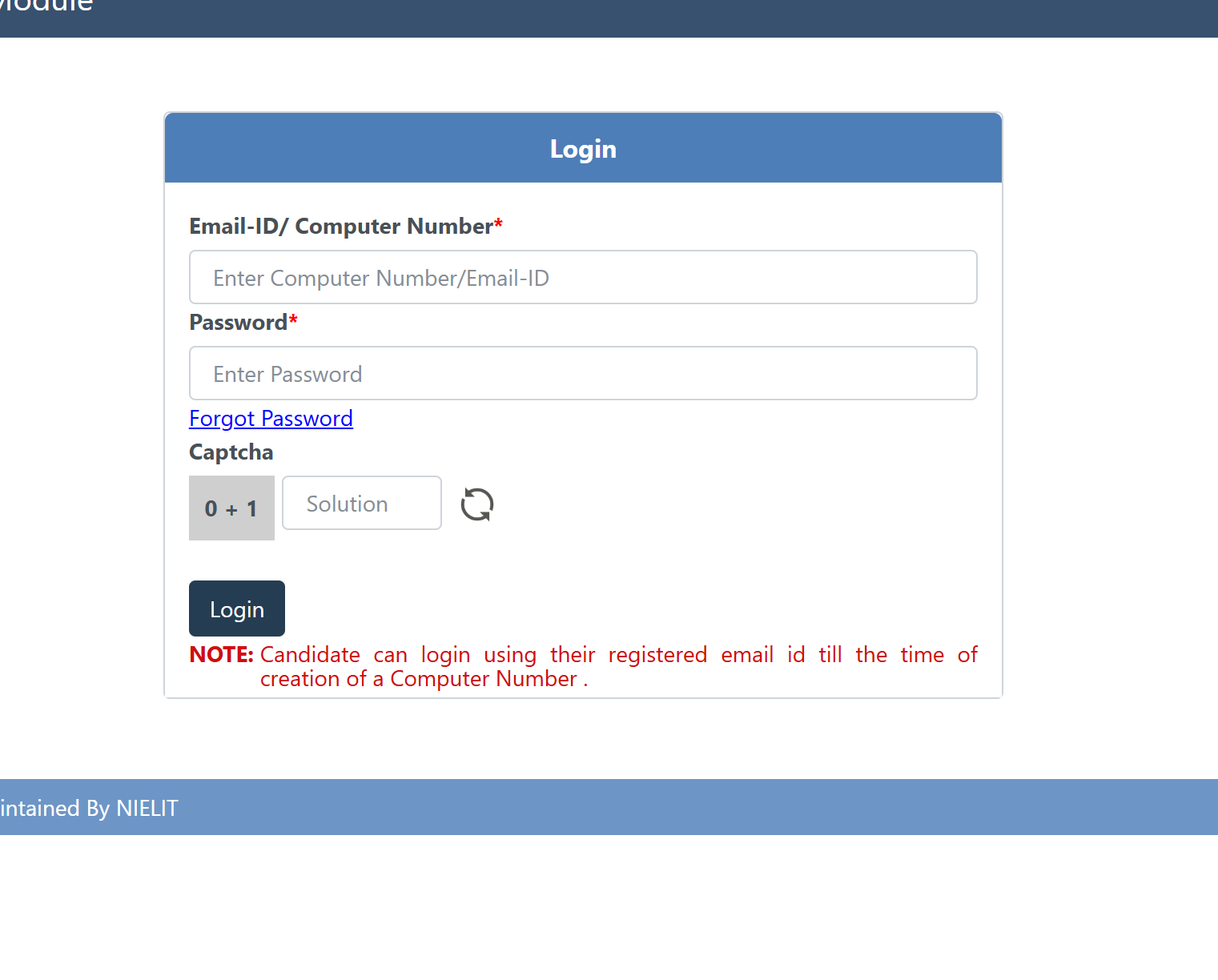
Login using:
Computer Number
Password
Tip: Copy-Paste functions do not work on the Pariksha DGCA Portal so manually type everything.
If you do not have a computer number, please register for it first.
Step 2: Select Examination Type
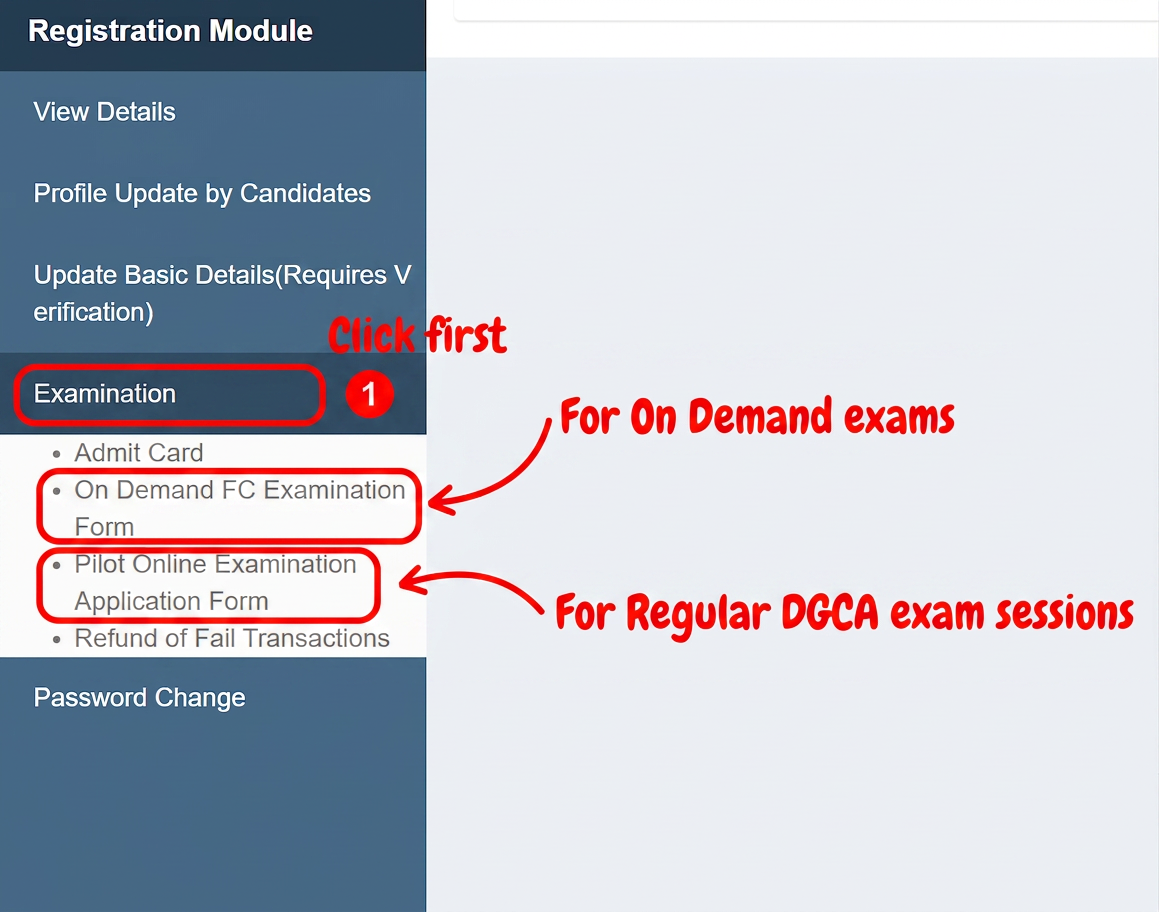
The first step on this screen is to click on Examinations buttons.
Now click on On Demand FC Examination Form (if registering for On Demand exams session) or Pilot Online Examination Application Form (if registering for regular session online pilot examinations).
Note: On Demand Exam Sessions cost Rupees 5000 while Regular Exam Sessions cost 2000 rupees.
Step 3: Select Session, Category, Center
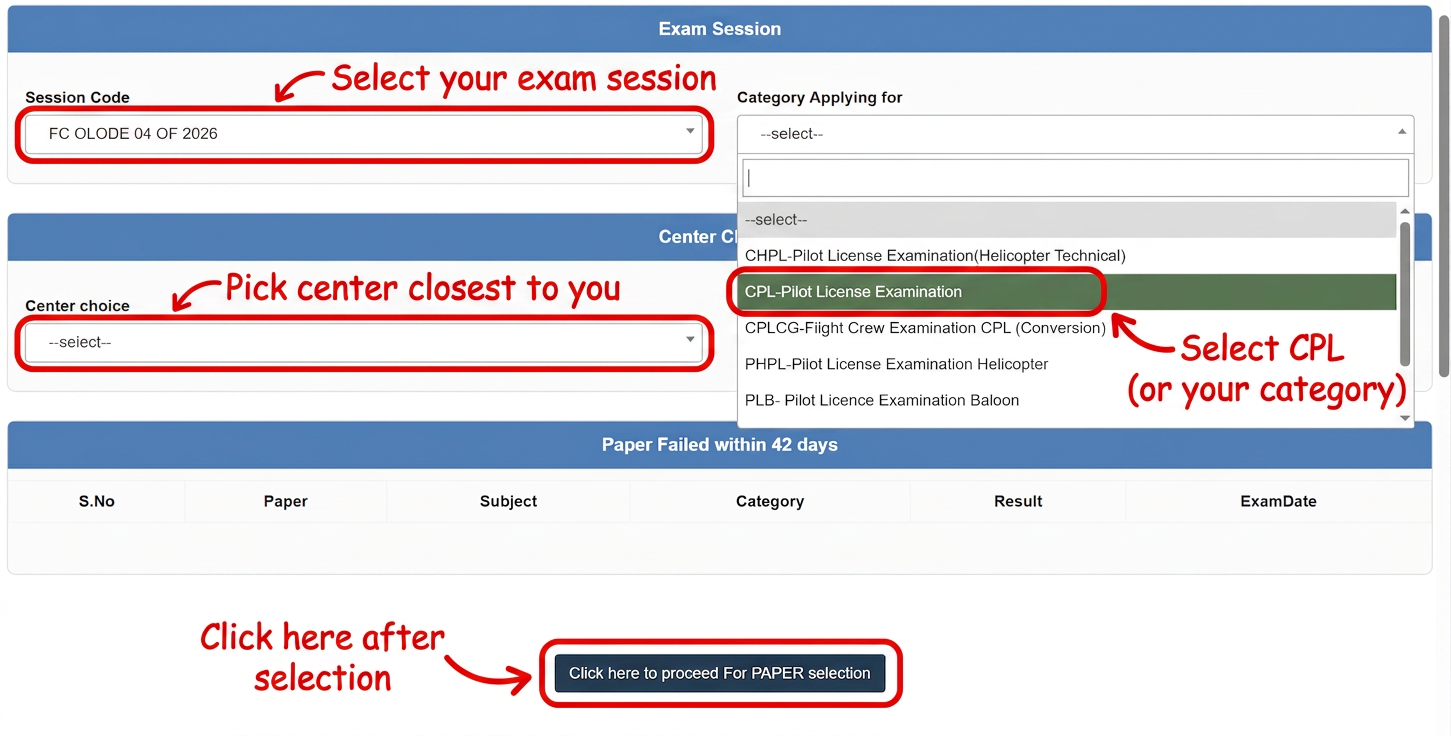
Now is the time to select session, category, center location
Session Code: select whatever option is available. You will always see only the current session.
Category Applying For: Select CPL in the category applying for. (This is applicable to most of our target audience unless you are applying for another category).
Center Choice: Select the center closest to you. Tip: The centers fill up fast so apply as soon as you can.
Now the final step here is to click on the button "Click here to Proceed for PAPER Selection".
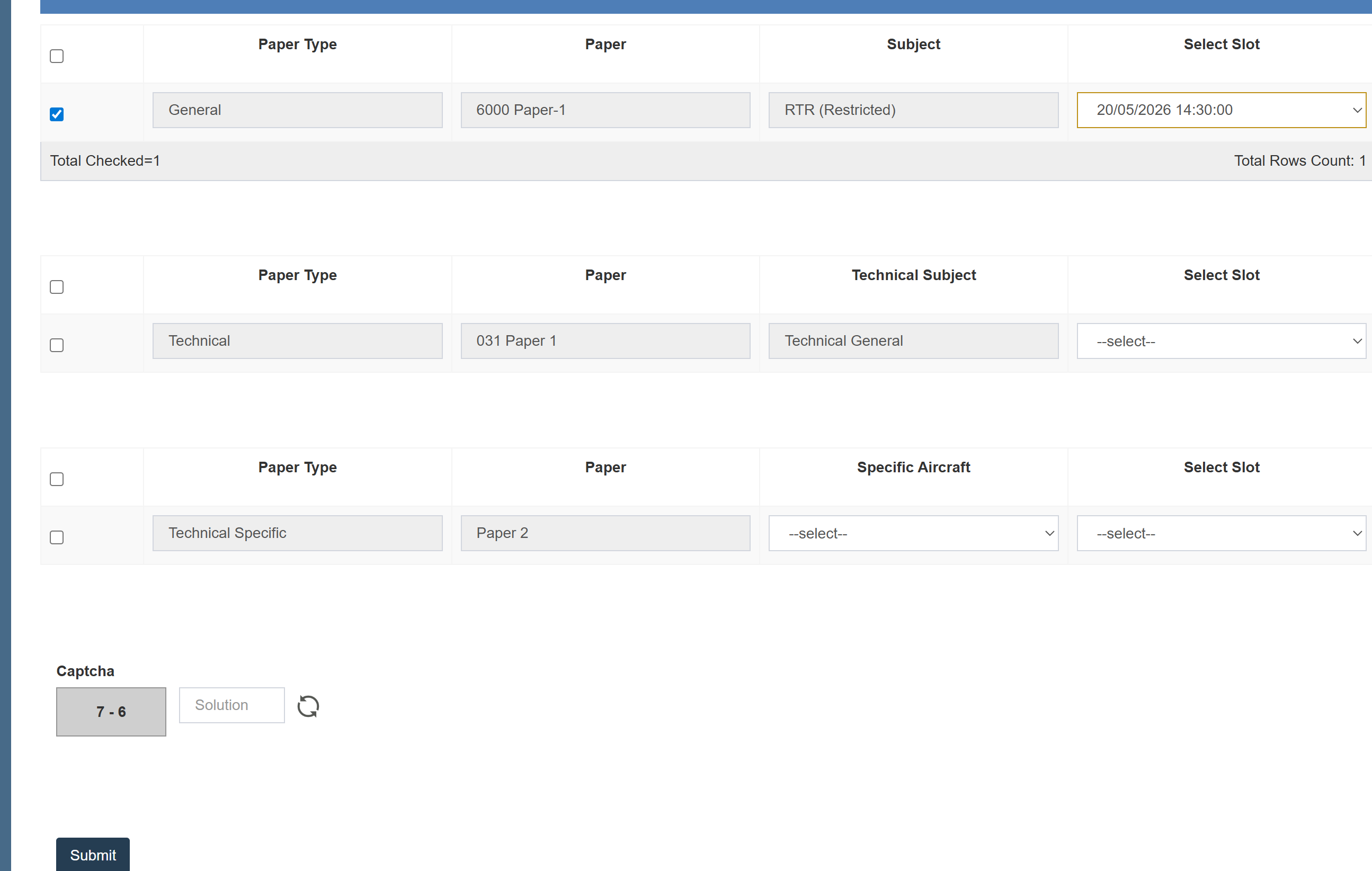
The screen will then refresh to the same page.
Select the paper type.
Select the time slot. (Option to select time slot is usually not available for regular session and auto assigned.
Click the submit button at the end after filling the captcha.
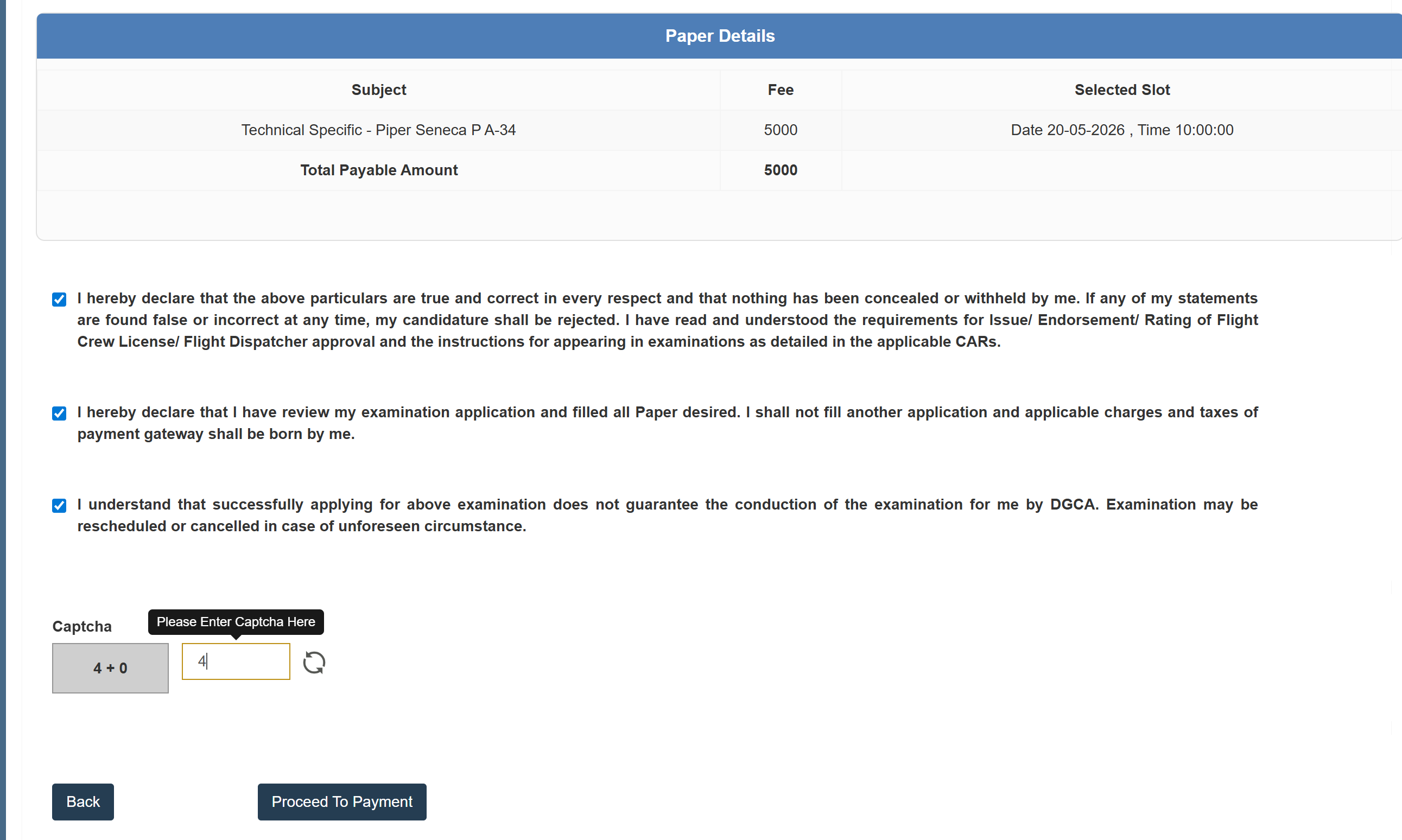
You will then see a confirmation screen. Simply check all the boxes and click on Proceed to Payment button.
On the payment screen, you will see a popup to login to Bharatkosh, simply close it and make the payment as per your choice.
Tip: The payment often fails on the DGCA Pariksha Portal. You will get the option to register and make the payment again in 3-5 hours.
How to Download DGCA Pariksha Admit Card
The admit card for the exam is released a few days before the exam. It is directly accessible on the website and sent via email 2-3 days before the exam.
Steps to download the Admit Card.
Step 1: Login to Pariksha DGCA portal as before.
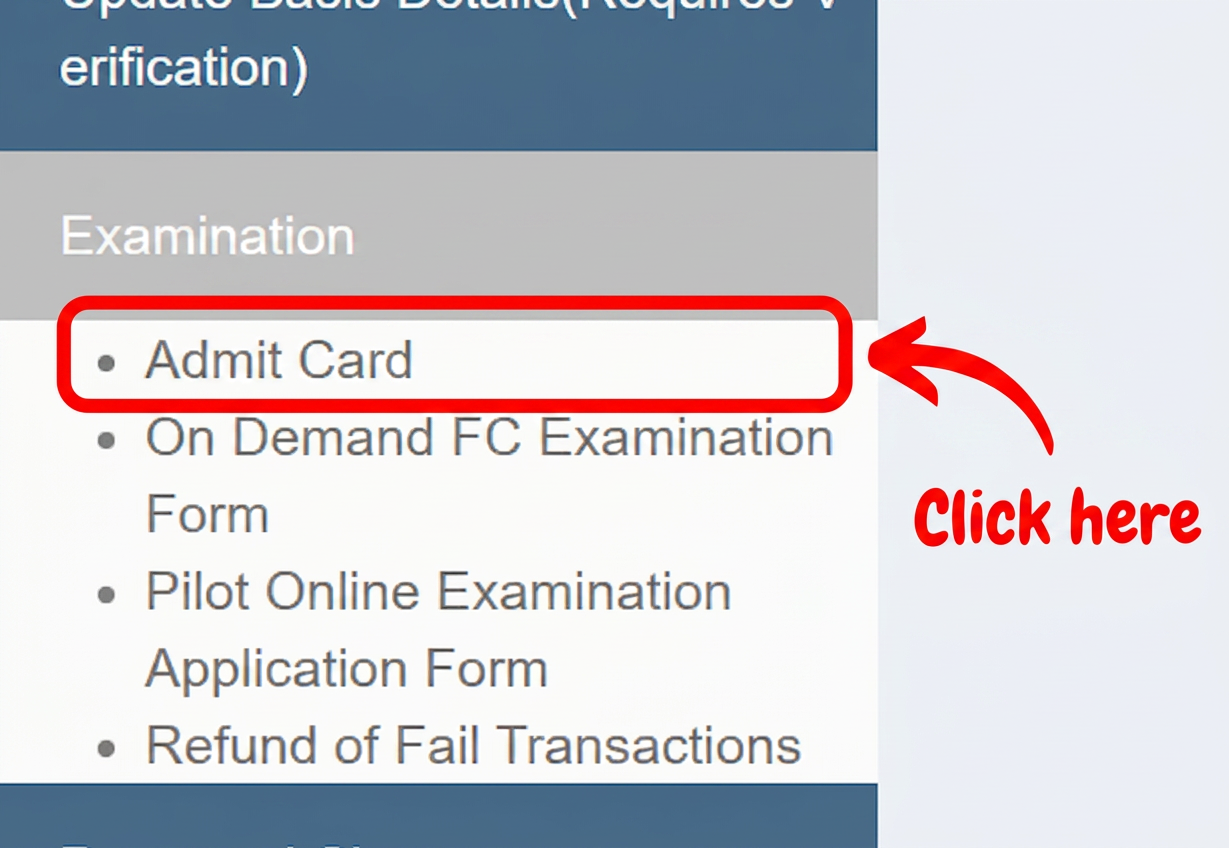
Step 2: Click on Admit Card button in the left side bar.
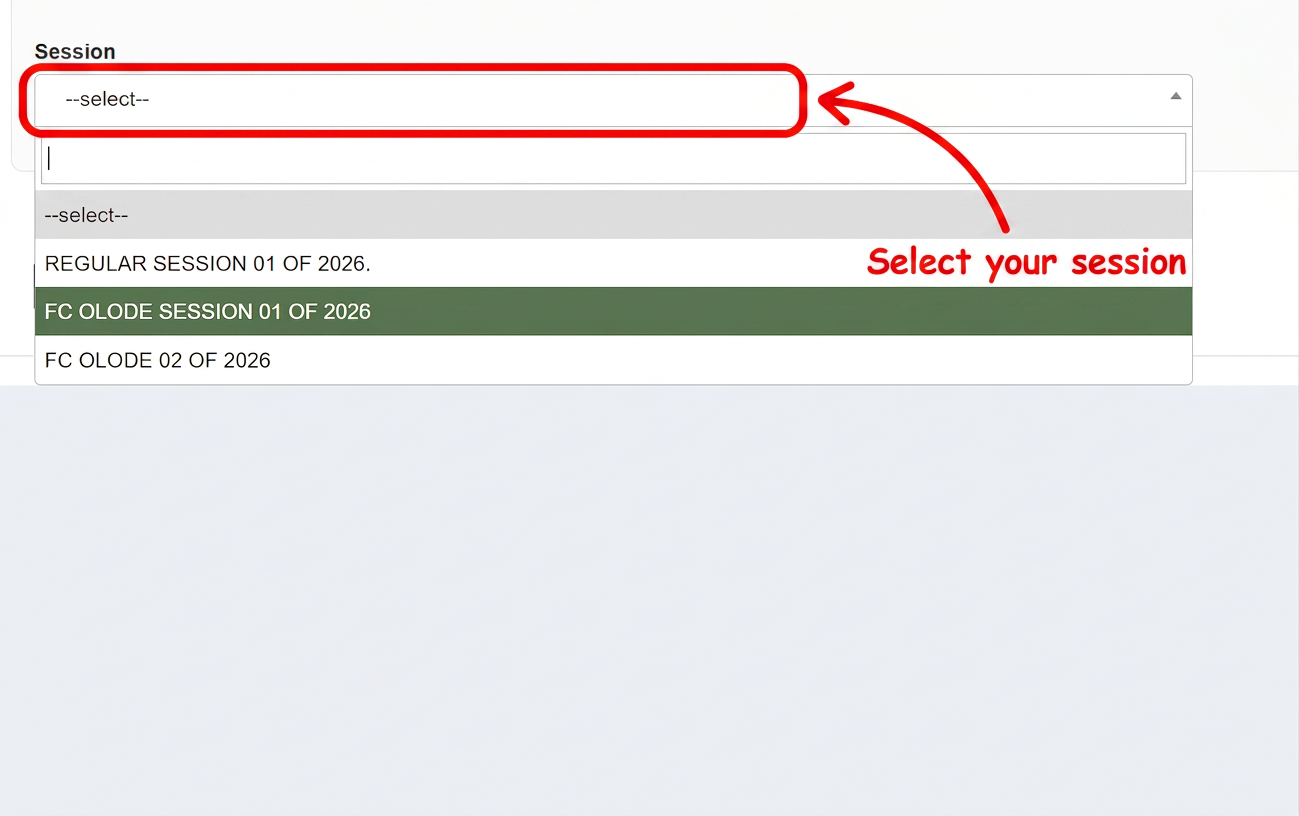
Step 3: Now select session you want to download the admit card for and click on submit button.
Issue with Admit Card Download: A major issue candidates face with the admit cards is that the DGCA Pariksha website crashes and becomes inaccessible as soon as the admit cards are released.
A way to mitigate this problem is to check the website at 3 AM when everyone is sleeping. There is not a lot of load on the servers DGCA is running the website on and one can easily download the admit card at this time.
DGCA Pariksha Results
DGCA sends result as a message via SMS usually within 7 days of the last examination.
You will receive an SMS similar to the one below when the result is declared.
Please note the result received via SMS is a provisional score. It can change depending on the situation which includes but not limited to change of answer key, wrong question, missing information in question.
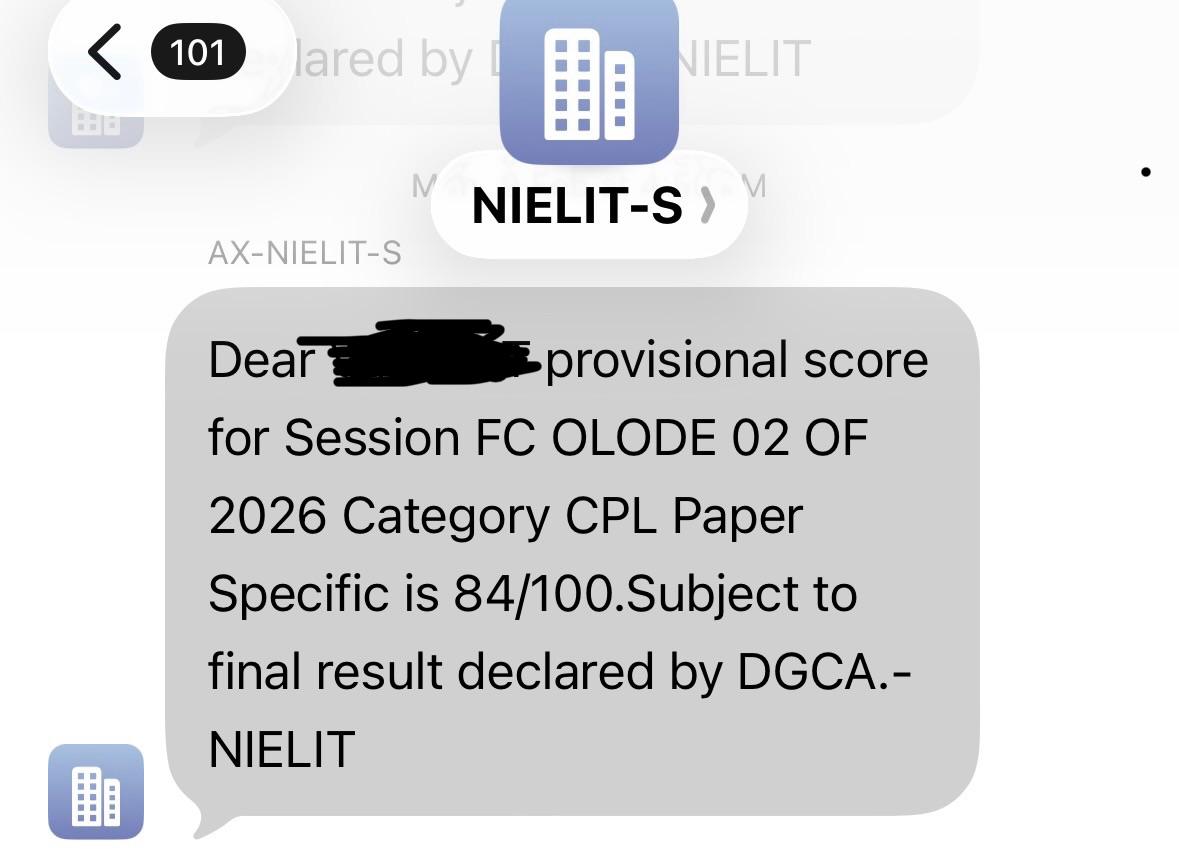
Official Final DGCA Results
The final result of DGCA exams is declared on the website in the notice board.
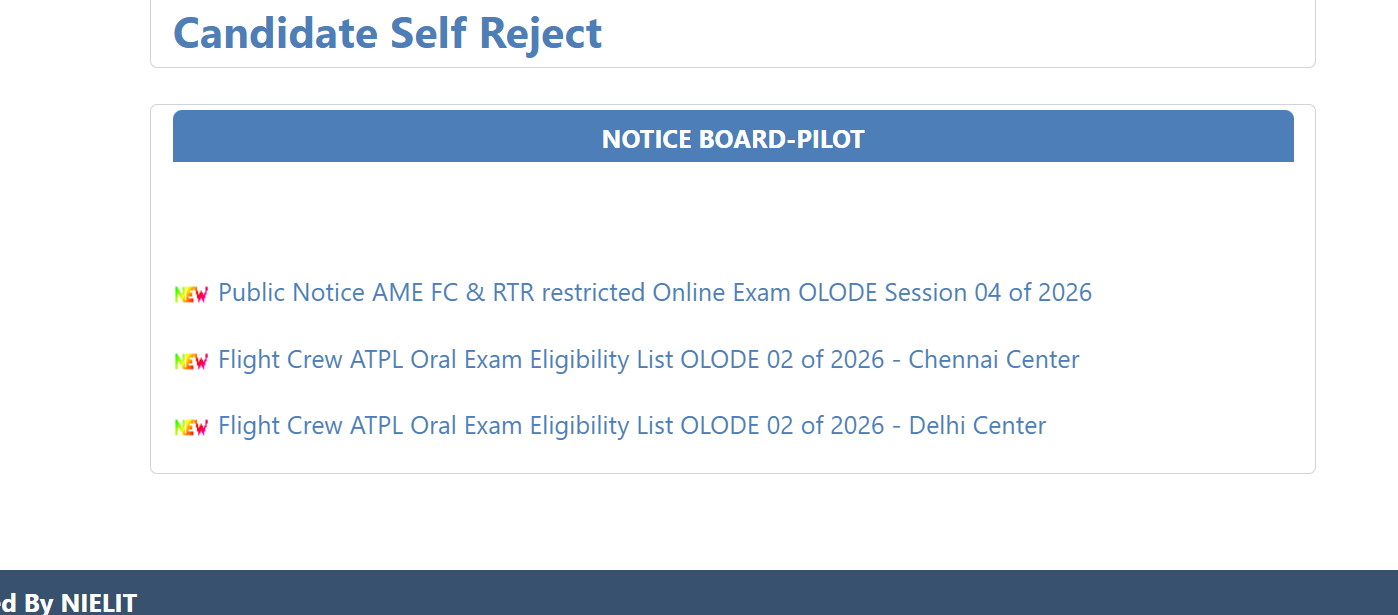
The Results PDF is in the format as below.
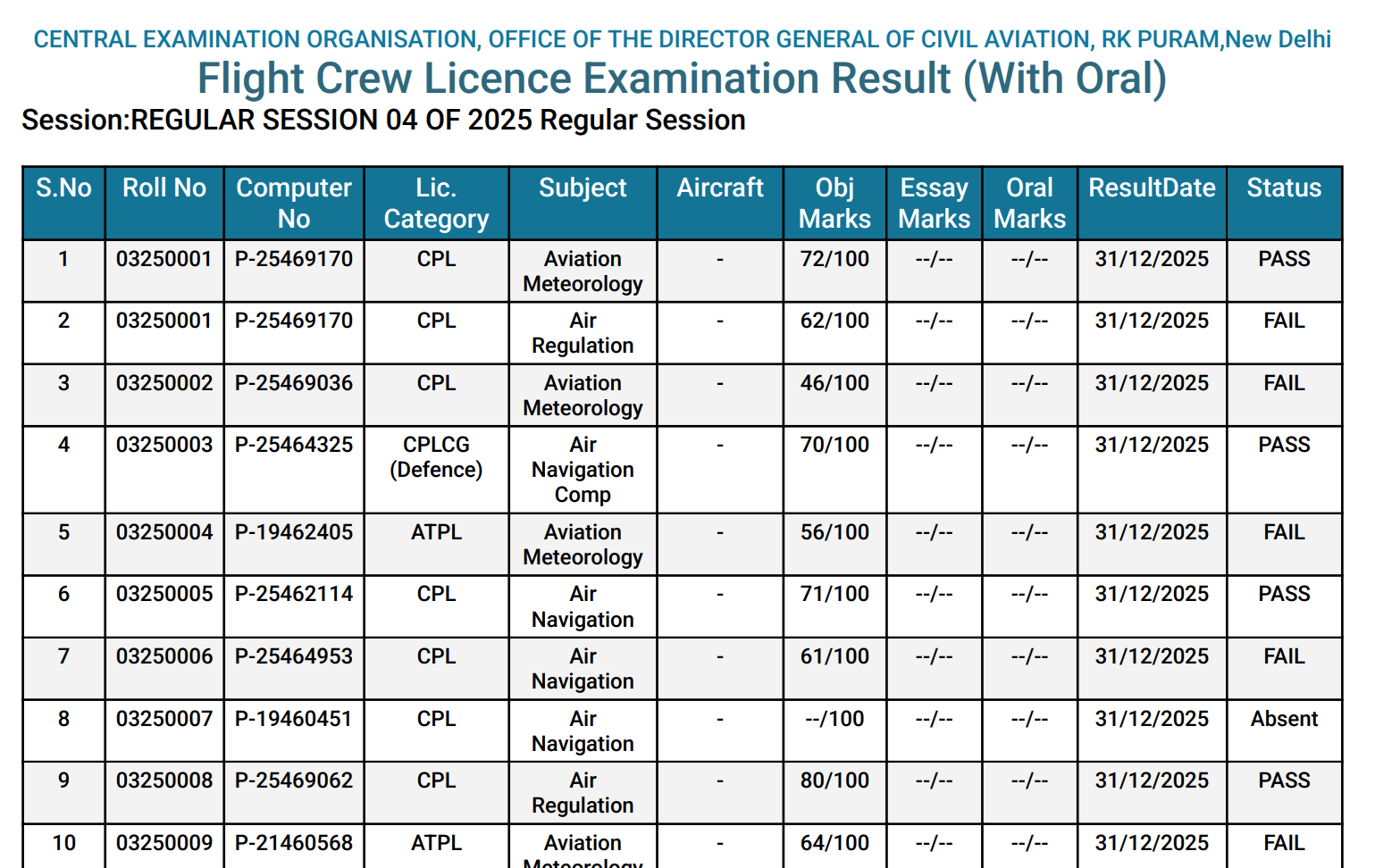
The results can also be viewed by logging into the website.
Frequently asked Questions
How many times can I give the DGCA exams?
There is no limit on the number of times the DGCA exams can be given. However there is a cooldown period of 42 days in case you fail an examination. This is only limited to the subject you failed in. DGCA has implemented this due to limited slots for the candidates.
What documents do I need to carry on the day of the exam?
You just need an identity proof which includes but not limited to Aadhar card, Driving license, Voter ID Card, Passport etc. Note: the eligible identity proof documents are subject to change. Make sure to read the updated list of documents on your admit card.
Is DGCA Pariksha only for pilots or also for AME?
The Pariksha portal is for all written examinations for Commerical Pilots, Private Pilots, ATPL Pilots, etc and also for AME examinations.
I don't see any available time slots for the exams when I am trying to register. What is the registration window?
Please note that the exams are conducted every month but the registration window is only open for about 4-7 days. Make sure to check the DGCA Pariksha website regularly to check for the latest registration window. It is available in the pilot notice board and always updated.
Do I need to register on eGCA before DGCA Pariksha?
Yes, you need to register on eGCA before registering on DGCA Pariksha portal. You also need to get a computer number to register for the DGCA exams.
What is the difference between DGCA Pariksha and eGCA?
The DGCA pariksha portal is dedicated to the written exams while the eGCA site is dedicated to oral exams, pilot medicals, logbook and all other features.
What is the fee for DGCA exams?
The fee is 5000 rupees for on demand session exams while regular sessions are offered at 2000 rupees.
What happens if I fail a DGCA exam?
You can give the DGCA exams as many times as you want but it is recommended that you study properly before giving the exam. There is a cooldown period of 42 days when you fail an exam. This means you cannot give the same exam for at least 42 days after failing it.
Can I edit my exam after booking?
No, once the exam is booked, no changes can be made. You cannot even cancel the exam. But the good thing is in case you do not appear for the exam, the 42 days cooldown period does not apply to you.
Can I give multiple subjects in one session?
Yes, you can give exams for multiple subjects in one session but make sure to select different timings in case you are applying for on demand exams. The timing is auto selected for regular session.
What is the difference between on-demand and regular exams?
The regular exams are conducted once every 4 months. The on demand DGCA exams are conducted once every month unless the month is for a regular session. More students appear for the regular session and hence it becomes more efficient for DGCA to conduct the exam and offer the exam at a cheaper cost. The regular sessions cost 2000 rupees while the on demand sessions cost 5000 rupees.
Can I appear for the DGCA exams without a Class 2 or Class 1 Medical?
Yes, you can appear for the DGCA exams without a medical. However it is recommended to get your medicals done as soon as possible as they are one of the most time consuming.
I have an issue with Pariksha DGCA portal. Whom do I reach out to?
DGCA has a helpline number for issues with DGCA Pariksha Portal. You can call on 011-26106091. Please note that DGCA operates this line from Monday to Friday, and the timings are from 9:30 AM to 6:00 PM. In some cases you even have to wait for hours for DGCA to answer the call. In this case you can also email the DGCA support team at [email protected].